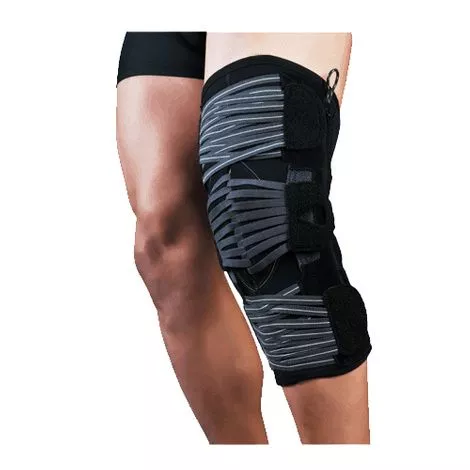
Optec Gladiator ROMPS Knee Brace Features
- Complex structure, equipped with patella stabilizer, offers comfortable containment of the patellar compartment
- Two patented, multicentric, adjustable aluminum rods are included to control flexion and extension quickly and easily
- Rods are equipped with bearings supporting the condyles, rigid tibial and femoral supports to control rotation
- Weight: 13.9oz
- Indicated for:
– Patellar honodropathy (Osteochondral repairs)
– Retropatellar
– Osteoarthritis
– Post-operative and post traumatic irritations including rehabilitation of: MCL, LCL, PCL, ACL (Sprains, Meniscus injuries, Lateral, Anterior, Medial, and Posterior tilt, etc)
– Post lateral release surgery to limit the extension and flexion of the joint
– Patella and knee instabilities (Patella dislocation, Patella subluxation, Patella alta, Patella stabilization, Patella tendon repairs)
– General knee pain
– Mild chondronmalacia
– Condylar fractures
– Tibial plateau fractures
More On Optec Gladiator ROMPS Knee Brace
Maintenance and Care:
- Wash gently with lukewarm water (machine or hand wash).
- Do not use any substances containing chlorine.
- Dry at a low setting.
- Washing does not damage the product and it actually restores the elasticity This product is not biodegradable.
Instructions:
- Open the strapping system.
- Carefully pull the brace up injured leg (keeping the label on the top). Position in such a way that the pressure pads surrounds the patella.
- Close the three (3) straps by pulling on both parts of the fasteners of each strap set at the same time, in the following order: Middle, Bottom, Top.
- 4 Metal Rod (ROM-Range of Motion) For Rod extension and flexion adjustment, the measurements must be indicated by the attending healthcare professional.
Instructions for the rectangular panel:
- Apply the enclosed rectangular panel to the back of the thigh, the rectangular panel should conform to the shape of the thigh.
- After applying the rectangular panel, tighten the straps using the technique shown in the instructions.
For adjustment:
- Open the side zippers to reveal the rigid internal supports; two (2) colored tags appear, the red for “Flexion” and the grey for “Extension” Pull the Flexion tab so that the loop wraps around the hook showing the number of desired degree. Do the same with the Extension tab. Repeat the same operation on the other rod then make sure that both rods have the same adjustments.
Side effects and Contra-Indications:
- Assuming that the products are used according to the instructions and given that they are non-invasive, there are no side effects affecting the organism as a whole. All brace and supports, if overly tight, can cause discomfort due to compression. Notify your healthcare professional if you observe any change in your general state. During a prolonged period of inactivity, it is recommended to reduce the tension on your device until you resume normal activities where you will reset the tension to the original level recommended to you by your healthcare professional.