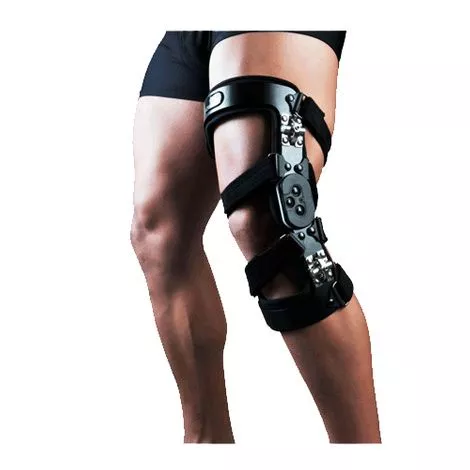
Optec Gladiator OA MAX Knee Brace Features
- Allows user to control abduction and adduction with a single Allen wrench
- Indicated for:
Unicompartmental knee conditions that require load reduction to the affected compartment such as:
– Articular cartilage defect repair
– Meniscal cartilage repair
– Avascular necrosis
– Osteochondritis dissecans
– Bone marrow lesions
– Tibial plateau fracture
– Meniscal injury and repair
– Cartilage transplant
– Post osteotomy - Weight: 1lb
More On Optec Gladiator OA MAX Knee Brace
Patient Fitting Instructions:
- Sit on the edge of a chair, the brace is put on the knee with the +/- 75º of flexion. Position the joint so that the center of the hinges are one inch above the joint line (see arrow). Make sure that the brace is not twisted on the knee.
- Tighten the bottom calf strap above the calf muscle, then the upper thigh strap.
- Tighten the inner straps to the upper and lower end of the metal bar. Following the blue line, trim the excess velcro off if the strap is too long.
- Tighten the outer straps to the upper and lower end of the metal bar. Following the blue line, trim the excess velcro off if the strap is too long.
- Tighten the straps to the upper of the metalbar. Following the blue line, trim the excess velcro off if the strap is too long.
- Now, adjust the varus / valgus hinges to control the curve of the metal bar so that the hinge will not pinch the knee when the knee is bent. When all strapping is complete, the pain in the affected side should be reduced while standing and walking.
Cleaning:
- This product can be hand washed in cold or lukewarm water with mild soap or detergent and air dried.
Warning:
- Should there be any rash developed, discontinue use and seek medical advise.
- This support should be snug but not impair circulation.
- Consult your doctor for any persistant problems.
- Settings of flexion/extension controls should be undertaken by medical professionals only.